Amazon S3 Vectors with Spice

The latest Spice.ai Open Source release (v1.5.0) brings major improvements to search, including native support for Amazon S3 Vectors. Announced in public preview at AWS Summit New York 2025, Amazon S3 Vectors is a new S3 bucket type purpose-built for vector embeddings, with dedicated APIs for similarity search.
Spice AI was a day 1 launch partner for S3 Vectors, integrating it as a scalable vector index backend. In this post, we explore how S3 Vectors integrates into Spice.ai’s data, search, and AI-inference engine, how Spice manages indexing and lifecycle of embeddings for production vector search, and how this unlocks a powerful hybrid search experience. We’ll also put this in context with industry trends and compare Spice’s approach to other vector database solutions like Qdrant, Weaviate, Pinecone, and Turbopuffer.
Amazon S3 Vectors Overview
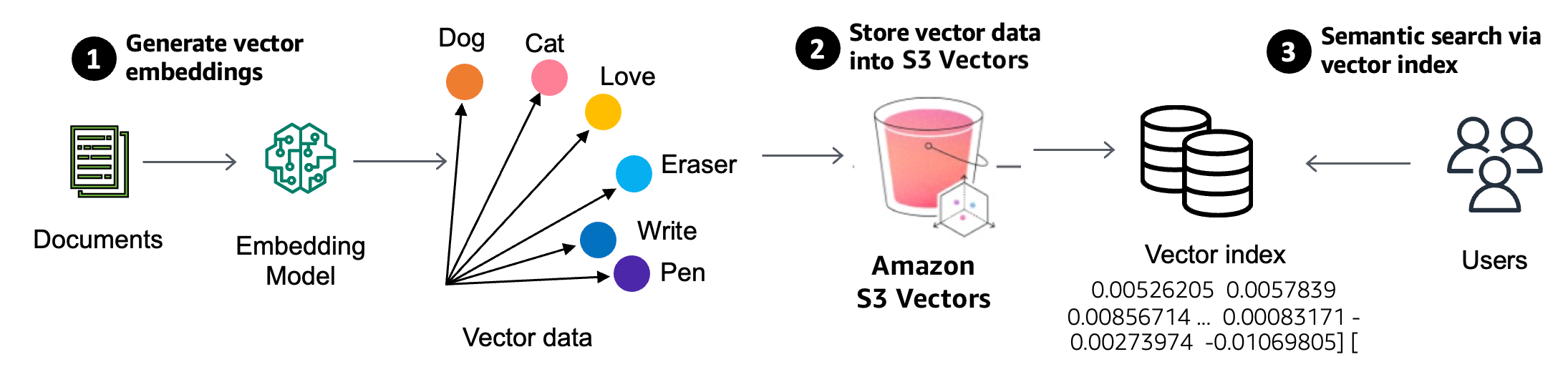
Amazon S3 Vectors extends S3 object storage with native support for storing and querying vectors at scale. As AWS describes, it is “designed to provide the same elasticity, scale, and durability as Amazon S3,” providing storage of billions of vectors and sub-second similarity queries. Crucially, S3 Vectors dramatically lowers the cost of vector search infrastructure – reducing upload, storage, and query costs by up to 90% compared to traditional solutions. It achieves this by separating storage from compute: vectors reside durably in S3, and queries execute on transient, on-demand resources, avoiding the need for always-on, memory-intensive vector database servers. In practice, S3 Vectors exposes two core operations:
-
Upsert vectors – assign a vector (an array of floats) to a given key (identifier) and optionally store metadata alongside it.
-
Vector similarity query – given a new query vector, efficiently find the stored vectors that are closest (e.g. minimal distance) to it, returning their keys (and scores).
This transforms S3 into a massively scalable vector index service. You can store embeddings at petabyte scale and perform similarity search with metrics like cosine or Euclidean distance via a simple API. It’s ideal for AI use cases like semantic search, recommendations, or Retrieval-Augmented Generation (RAG) where large volumes of embeddings need to be queried semantically. By leveraging S3’s pay-for-use storage and ephemeral compute, S3 Vectors can handle infrequent or large-scale queries much more cost-effectively than memory-bound databases, yet still deliver sub-second results.
Vector Search with Embeddings
Vector similarity search retrieves data by comparing items in a high-dimensional embedding space rather than by exact keywords. In a typical pipeline:
-
Data to vectors: We first convert each data item (text, image, etc.) into a numeric vector representation (embedding) using an ML model. For example, a customer review text might be turned into a 768-dimensional embedding that encodes its semantic content. Models like Amazon Titan Embeddings, OpenAI, or Hugging Face sentence transformers handle this step .
-
Index storage: These vectors are stored in a specialized index or database optimized for similarity search. This could be a dedicated vector database or, in our case, Amazon S3 Vectors acting as the index. Each vector is stored with an identifier (e.g. the primary key of the source record) and possibly metadata.
-
Query by vector: A search query (e.g. a phrase or image) is also converted into an embedding vector. The vector index is then queried to find the closest stored vectors by distance metric (cosine, Euclidean, dot product, etc.) . The result is a set of IDs of the most similar items, often with a similarity score.
This process enables semantic search – results are returned based on meaning and similarity rather than exact text matches. It powers features like finding relevant documents by topic even if exact terms differ, recommendation systems (finding similar user behavior or content), and providing knowledge context to LLMs in RAG. With Spice.ai’s integration, this whole lifecycle (embedding data, indexing vectors, querying) is managed by the Spice runtime and exposed via a familiar SQL or HTTP interface .
Amazon S3 Vectors in Spice.ai
Spice.ai is an open-source data, search and AI compute engine that supports vector search end-to-end. By integrating S3 Vectors as a vector index, Spice can embed data, store embeddings in S3, and perform similarity queries – all orchestrated through simple configuration and SQL queries. Let’s walk through how you enable and use this in Spice.
Configuring a Dataset with Embeddings
To use vector search, you annotate your dataset schema to specify which column(s) to embed and with which model. Spice supports various embedding models (local or hosted) via the embeddings section in the configuration. For example, suppose we have a customer reviews table and we want to enable semantic search over the review text (body column):
datasets:
  - from: oracle:"CUSTOMER_REVIEWS"
    name: reviews
    columns:
      - name: body
        embeddings:
          from: bedrock_titan # use an embedding model defined below

embeddings:
  - from: bedrock:amazon.titan-embed-text-v2:0
    name: bedrock_titan
    params:
      aws_region: us-east-2
      dimensions: '256'
In this spicepod.yaml, we defined an embedding model bedrock_titan (using AWS Bedrock Titan text embedding model in this case) and attached it to the body column. When the Spice runtime ingests the dataset, it will automatically generate a vector embedding for each row’s body text using that model. By default, Spice can either store these vectors in its acceleration layer or compute them on the fly. However, with S3 Vectors, we can offload them to an S3 Vectors index for scalable storage.
To use S3 Vectors, we simply enable the vector engine in the dataset config:
datasets:
  - from: oracle:"CUSTOMER_REVIEWS"
    name: reviews
    vectors:
      enabled: true
      engine: s3_vectors
      params:
        s3_vectors_bucket: my-s3-vector-bucket
        # ... (rest of dataset definition as above)
This tells Spice to create or use an S3 Vectors index (in the specified S3 bucket) for storing the body embeddings. Spice will manage the index lifecycle: it creates the vector index, handles inserting each vector with its primary key into S3, and knows how to query it. The embedding model and data source are as before – the only change is where the vectors are stored and queried. The benefit is that now our vectors reside in S3’s highly scalable storage, and we can leverage S3 Vectors’ efficient similarity search API.
Performing a Vector Search Query
Once configured, performing a semantic search is straightforward. Spice exposes both an HTTP endpoint and a SQL table-valued function for vector search. For example, using the HTTP API:
curl -X POST http://localhost:8090/v1/search \
 -H "Content-Type: application/json" \
 -d '{
 "datasets": ["reviews"],
 "text": "issues with same day shipping",
 "additional_columns": ["rating", "customer_id"],
 "where": "created_at >= now() - INTERVAL '7 days'",
 "limit": 2
 }'
This JSON query says: search the reviews dataset for items similar to the text "issues with same day shipping", and return the top 2 results, including their rating and customer_id, filtered to reviews from the last 7 days. The Spice engine will embed the query text (using the same model as the index), perform a similarity lookup in the S3 Vectors index, filter by the WHERE clause, and return the results. A sample response might look like:
{
  "results": [
    {
      "matches": {
        "body": "Everything on the site made it seem like I’d get it the same day. Still waiting the next morning was a letdown."
      },
      "data": { "rating": 3, "customer_id": 6482 },
      "primary_key": { "review_id": 123 },
      "score": 0.82,
      "dataset": "reviews"
    },
    {
      "matches": {
        "body": "It was marked as arriving 'today' when I paid, but the delivery was pushed back without any explanation. Timing was kind of important for me."
      },
      "data": { "rating": 2, "customer_id": 3310 },
      "primary_key": { "review_id": 24 },
      "score": 0.76,
      "dataset": "reviews"
    }
  ],
  "duration_ms": 86
}
Each result includes the matching column snippet (body), the additional requested fields, the primary key, and a relevance score. In this case, the two reviews shown are indeed complaints about “same day” delivery issues, which the vector search found based on semantic similarity to the query.
Developers can also use SQL for the same operation. Spice provides a table function vector_search(dataset, query) that can be used in the FROM clause of a SQL query. For example, the above search could be expressed as:
SELECT review_id, rating, customer_id, body, score
FROM vector_search(reviews, 'issues with same day shipping')
WHERE created_at >= to_unixtime(now() - INTERVAL '7 days')
ORDER BY score DESC
LIMIT 2;
This would yield a result set (with columns like review_id, score, etc.) similar to the JSON above, which you can join or filter just like any other SQL table. This ability to treat vector search results as a subquery/table and combine them with standard SQL filtering is a powerful feature of Spice.ai’s integration – few other solutions let you natively mix vector similarity and relational queries so seamlessly.
See a 2-min demo of it in action:
Managing Embeddings Storage in Spice.ai
An important design question for any vector search system is where and how to store the embedding vectors for efficient querying. Before introducing S3 Vectors, Spice offered two approaches for managing vectors:
-
Accelerator storage: Embed the data in advance and store the vectors alongside other cached data in a Data Accelerator (Spice’s high-performance materialization layer). This keeps vectors readily accessible in memory or fast storage.
-
Just-in-time computation: Compute the necessary vectors on the fly during a query, rather than storing them persistently. For example, at query time, embed only the subset of rows that satisfy recent filters (e.g. all reviews in the last 7 days) and compare those to the query vector.
Both approaches have trade-offs. Pre-storing in an accelerator provides quick query responses but may not be feasible for very large datasets (which might not fit entirely in fast storage) and accelerators, like DuckDB or SQLite aren’t optimized for similarity search algorithms on billion-scale vectors. Just-in-time embedding avoids extra storage but can become too slow if you need to scan a lot of data for each query, and it misses the whole point of having an index to prune search space.
Amazon S3 Vectors offers a compelling third option: the scalability of S3 with built-in vector indexing. By configuring the dataset with engine: s3_vectors as shown earlier, Spice will offload the vector storage and similarity computations to S3 Vectors. This means you can handle very large embedding sets (millions or billions of items) without worrying about Spice’s memory or local disk limits, and still get fast similarity search via S3’s API. In practice, when Spice ingests data, it will embed each row’s body and PUT it into the S3 Vector index (with the review_id as the key, and possibly some metadata). At query time, Spice calls S3 Vectors’ query API to retrieve the nearest neighbors for the embedded query. All of this is abstracted away; you simply query Spice and it orchestrates these steps.
The Spice runtime manages index creation, updates, and deletion. For instance, if new data comes in or old data is removed, Spice will synchronize those changes to the S3 vector index. Developers don’t need to directly interact with S3 – it’s configured once in YAML. This tight integration accelerates application development : your app can treat Spice like any other database, while behind the scenes Spice leverages S3’s elasticity for the heavy lifting.
Vector Index Usage in Query Execution
How does a vector index actually get used in Spice’s query planner? To illustrate, consider the simplified SQL we used:
SELECT *
FROM vector_search(reviews, 'issues with same day shipping')
ORDER BY score DESC
LIMIT 5;
Logically, without a vector index, Spice would have to do the following at query time:
-
Embed the query text 'issues with same day shipping' into a vector
v. -
Retrieve or compute all candidate vectors for the searchable column (here every body embedding in the dataset). This could mean scanning every row or at least every row matching other filters.
-
Calculate distances between the query vector
vand each candidate vector, compute a similarity score (e.g.score = 1 - distance). -
Sort all candidates by the score and take the top 5.
For large datasets, steps 2–4 would be extremely expensive (a brute-force scan through potentially millions of vectors for each search). This is exactly why we use a vector index: to avoid computing distances to every item by pre-indexing the vector space for approximate nearest neighbors.
With S3 Vectors, step 2 and 3 are pushed down to the S3 service. The vector index can directly return the top K closest matches to v. Conceptually, S3 Vectors gives back an ordered list of primary keys with their similarity scores. For example, it might return something like: {(review_id=123, score=0.82), (review_id=24, score=0.76), ...} up to K results.
Spice then uses these results as a temporary table (let’s call it vector_query_results) which it can join with the main reviews table to get the full records. In SQL pseudocode, Spice does something akin to:
-- The vector index returns the closest matches into a temp table
CREATE TEMP TABLE vector_query_results (
 review_id BIGINT,
 score FLOAT
);
Imagine this temp table is populated by S3 Vectors for the query.
-- Now we join to retrieve full details
SELECT r.review_id, r.rating, r.customer_id, r.body, v.score
FROM vector_query_results v
JOIN reviews r ON r.review_id = v.review_id
ORDER BY v.score DESC
LIMIT 5;
This way, only the top few results (say 50 or 100 candidates) are processed in the database, rather than the entire dataset. The heavy work of narrowing down candidates occurs inside the vector index. Spice essentially treats vector_search(dataset, query) as a table-valued function that produces (id, score) pairs which are then joinable.
Handling Filters Efficiently
One consideration when using an external vector index is how to handle additional filter conditions (the WHERE clause). In our example, we had a filter created_at >= now() - 7 days. If we simply retrieve the top K results from the vector search and then apply the time filter, we might run into an issue: those top K might not include any recent items, even if there are relevant recent items slightly further down the similarity ranking. This is because S3 Vectors (like most ANN indexes) will return the top K most similar vectors globally, unaware of our date constraint.
If only a small fraction of the data meets the filter, a naive approach could drop most of the top results, leaving fewer than the desired number of final results. For example, imagine the vector index returns 100 nearest reviews overall, but only 5% of all reviews are from the last week – we’d expect only ~5 of those 100 to be recent, possibly fewer than the LIMIT. The query could end up with too few results not because they don’t exist, but because the index wasn’t filter-aware and we truncated the candidate list.
To solve this, S3 Vectors supports metadata filtering at query time. We can store certain fields as metadata with each vector and have the similarity search constrained to vectors where the metadata meets criteria. Spice.ai leverages this by allowing you to mark some dataset columns as “vector filterable”. In our YAML, we could do:
columns:
  - name: created_at
    metadata:
      vectors: filterable
By doing this, Spice will include the created_at value with each vector it upserts to S3, and it will push down the time filter into the S3 Vectors query. Under the hood, the S3 vector query will then return only nearest neighbors that also satisfy created_at >= now()-7d. This greatly improves both efficiency and result relevance. The query execution would conceptually become:
-- Vector query with filter returns a temp table including the metadata
CREATE TEMP TABLE vector_query_results (
 review_id BIGINT,
 score FLOAT,
 created_at TIMESTAMP
);
-- vector_query_results is already filtered to last 7 days

SELECT r.review_id, r.rating, r.customer_id, r.body, v.score
FROM vector_query_results v
JOIN reviews r ON r.review_id = v.review_id
-- (no need for additional created_at filter here, it’s pre-filtered)
ORDER BY v.score DESC
LIMIT 5;
Now the index itself is ensuring we get, say, the 100 most similar reviews that are from the last week, which means after filtering we likely have a full slate of 5 results to return.
Including Data to Avoid Joins
Another optimization Spice supports is storing additional, non-filterable columns in the vector index to entirely avoid the join back to the main table for certain queries. For example, we might mark rating, customer_id, or even the text body as non-filterable vector metadata. This means these fields are stored with the vector in S3, but not used for filtering (just for retrieval). In the Spice config, it would look like:
columns:
  - name: rating
    metadata:
      vectors: non-filterable
  - name: customer_id
    metadata:
      vectors: non-filterable
  - name: body
    metadata:
      vectors: non-filterable
With this setup, when Spice queries S3 Vectors, the vector index will return not only each match’s review_id and score, but also the stored rating, customer_id, and body values. Thus, the temporary vector_query_results table already has all the information needed to satisfy the query. We don’t even need to join against the reviews table unless we want some column that wasn’t stored. The query can be answered entirely from the index data:
SELECT review_id, rating, customer_id, body, score
FROM vector_query_results
ORDER BY score DESC
LIMIT 5;
This is particularly useful for read-heavy query workloads where hitting the main database adds latency. By storing the most commonly needed fields along with the vector, Spice’s vector search behaves like an index-only query (similar to covering indexes in relational databases). You trade a bit of extra storage in S3 (duplicating some fields) for faster queries that bypass the heavier join.
It’s worth noting that you should choose carefully which fields to mark as metadata – too many or very large fields could increase index storage and query payload sizes. Spice gives you the flexibility to include just what you need for filtering and projection to optimize each use case.
Beyond Basic Vector Search in Spice
Many real-world search applications go beyond a single-vector similarity lookup. Spice.ai’s strength is that it’s a full database engine, so you can compose more complex search workflows, including hybrid search (combining keyword/text search with vector search), multi-vector queries, re-ranking strategies, and more. Spice provides both an out-of-the-box hybrid search API and the ability to write custom SQL to implement advanced retrieval logic.
-
Multiple vector fields or multi-modal search: You might have vectors for different aspects of data (e.g. an e-commerce product could have an embedding of its description text and another of its image). Or, say, a document has a title and body with separate embeddings – you may want to search both and combine results. Spice lets you do vector search on multiple columns easily, and you can weight the importance of each. For instance, you might boost matches in the title higher than matches in the body. This can be done via SQL by doing two vector_search subqueries and then merging results with a weighted score, as illustrated below.
-
Hybrid vector + keyword search: Sometimes you want to ensure certain keywords are present while also using semantic similarity. Spice supports hybrid search natively – its default
/v1/searchHTTP API actually performs both full-text BM25 search and vector search, then merges results using Reciprocal Rank Fusion (RRF) . This means you get a balanced result set that accounts for direct keyword matches as well as semantic similarity. In Spice’s SQL, you can also call text_search(dataset, query) for traditional full-text search, and combine it with vector_search results. The example below demonstrates how RRF can be implemented in SQL by combining ranks. -
Two-phase retrieval (re-ranking): A common optimization is to use a fast first-pass retrieval (like keyword search or a lightweight vector search) to get a larger candidate set (say top 100), then apply a more expensive or precise ranking on those (like a transformer re-ranker or a more exact distance calculation) to pick the final top 10. With Spice, you can orchestrate this in SQL or in application code. For example, you could query a BM25 index for top 100, then feed those into a vector search (restricted to those IDs) for a second phase. Or vice versa, take 100 vector results and then sort them by a keyword score. Since Spice supports standard SQL constructs, you can express these multi-step plans with common table expressions (CTEs) and joins.
To illustrate hybrid search, here’s a SQL snippet that uses the Reciprocal Rank Fusion (RRF) technique to merge vector and text search results for the same query:
WITH
vector_results AS (
 SELECT review_id, RANK() OVER (ORDER BY score DESC) AS vector_rank
 FROM vector_search(reviews, 'issues with same day shipping')
),
text_results AS (
 SELECT review_id, RANK() OVER (ORDER BY score DESC) AS text_rank
 FROM text_search(reviews, 'issues with same day shipping')
)
SELECT
 COALESCE(v.review_id, t.review_id) AS review_id,
 -- RRF scoring: 1/(60+rank) from each source
 (1.0 / (60 + COALESCE(v.vector_rank, 1000)) +
 1.0 / (60 + COALESCE(t.text_rank, 1000))) AS fused_score
FROM vector_results v
FULL OUTER JOIN text_results t ON v.review_id = t.review_id
ORDER BY fused_score DESC
LIMIT 50;
This takes the vector similarity results and text (BM25) results, assigns each a rank, and then combines them so that an item that is high in both lists will score the best overall. (Using constants like 60 is a way to dampen the influence of lower-ranked items – see the RRF paper for details.) Spice’s ability to join on the document IDs (which both searches return) makes this straightforward.
For a multi-column vector search example, suppose our reviews dataset has both a title and body with embeddings, and we want to prioritize title matches higher. We could do:
WITH
body_results AS (
 SELECT review_id, score AS body_score
 FROM vector_search(reviews, 'issues with same day shipping', col => 'body')
),
title_results AS (
 SELECT review_id, score AS title_score
 FROM vector_search(reviews, 'issues with same day shipping', col => 'title')
)
SELECT
 COALESCE(body.review_id, title.review_id) AS review_id,
 COALESCE(body_score, 0) + 2.0 * COALESCE(title_score, 0) AS combined_score
FROM body_results
FULL OUTER JOIN title_results ON body_results.review_id = title_results.review_id
ORDER BY combined_score DESC
LIMIT 5;
Here we arbitrarily weight the title’s vector score twice as much as the body’s score when both are present. This way, a result that matches well on title will rank higher than one that only matches in the body. Again, the join by review_id merges the two result sets.
These examples scratch the surface of what you can do by leveraging Spice’s SQL-based composition. The key point is that Spice isn’t just a vector database – it’s a hybrid engine that lets you combine vector search with other query logic (text search, filters, joins, aggregations, etc.) all in one place. This can significantly simplify building complex search and AI-driven applications.
(Note: Like most vector search systems, S3 Vectors uses an approximate nearest neighbor (ANN) algorithm under the hood for performance . This yields fast results that are probabilistically the closest, which is usually an acceptable trade-off in practice. Additionally, in our examples we focused on one embedding per row; production systems may use techniques like chunking text into multiple embeddings or adding external context, but the principles above remain the same.)
Industry Context and Comparisons
The rise of vector databases over the past few years (Pinecone, Qdrant, Weaviate, etc.) has been driven by the need to serve AI applications with semantic search at scale. Each solution takes a slightly different approach in architecture and trade-offs. Spice.ai’s integration with Amazon S3 Vectors represents a newer trend in this space: decoupling storage from compute for vector search, analogous to how data warehouses separated compute and storage in the past. Let’s compare this approach with some existing solutions:
-
Traditional Vector Databases (Qdrant, Weaviate, Pinecone): These systems typically run as dedicated services or clusters that handle both the storage of vectors (on disk or in-memory) and the computation of similarity search. For example, Qdrant (an open-source engine in Rust) allows either in-memory storage or on-disk storage (using RocksDB) for vectors and payloads . It’s optimized for high performance and offers features like filtering, quantization, and distributed clustering , but you generally need to provision servers/instances that will host all your data and indexes. Weaviate, another popular open-source vector DB, uses a Log-Structured Merge (LSM) tree based storage engine that persists data to disk and keeps indexes in memory . Weaviate supports hybrid search (it can combine keyword and vector queries) and offers a GraphQL API, with a managed cloud option priced mainly by data volume . Pinecone, a fully managed SaaS, also requires you to select a service tier or pod which has certain memory/CPU allocated for your index – essentially your data lives in Pinecone’s infrastructure, not in your AWS account. These solutions excel at low-latency search for high query throughput scenarios (since data is readily available in RAM or local SSD), but the cost can be high for large datasets. You pay for a lot of infrastructure to be running, even during idle times. In fact, prior to S3 Vectors, vector search engines often stored data in memory at ~$2/GB and needed multiple replicas on SSD, which is “the most expensive way to store data”, as Simon Eskildsen (Turbopuffer’s founder) noted . Some databases mitigate cost by compressing or offloading to disk, but still, maintaining say 100 million embeddings might require a sizable cluster of VMs or a costly cloud plan.
-
Spice.ai with Amazon S3 Vectors: This approach flips the script by storing vectors in cheap, durable object storage (S3) and loading/indexing them on demand. As discussed, S3 Vectors keeps the entire vector dataset in S3 at ~$0.02/GB storage , and only spins up transient compute (managed by AWS) to serve queries, meaning you aren’t paying for idle GPU or RAM time. AWS states this design can cut total costs by up to 90% while still giving sub-second performance on billions of vectors . It’s essentially a serverless vector search model – you don’t manage servers or even dedicated indices; you just use the API. Spice.ai’s integration means developers get this cost-efficiency without having to rebuild their application: they can use standard SQL and Spice will push down operations to S3 Vectors as appropriate. This decoupled storage/compute model is ideal for use cases where the data is huge but query volumes are moderate or bursty (e.g., an enterprise semantic search that is used a few times an hour, or a nightly ML batch job). It avoids the “monolithic database” scenario of having a large cluster running 24/7 . However, one should note that if you need extremely high QPS (thousands of queries per second at ultra-low latency), a purely object-storage-based solution might not outperform a tuned in-memory vector DB – AWS positions S3 Vectors as complementary to higher-QPS solutions like OpenSearch for real-time needs .
-
Turbopuffer: Turbopuffer is a startup that, much like Spice with S3 Vectors, is built from first principles on object storage. It provides “serverless vector and full-text search… fast, 10× cheaper, and extremely scalable,” by leveraging S3 or similar object stores with smart caching . The philosophy is the same: use the durability and low cost of object storage for the bulk of data, and layer a cache (memory/SSD) in front for performance-critical portions. According to Turbopuffer’s founder, moving from memory/SSD-centric architectures to an object storage core can yield 100× cost savings for cold data and 6–20× for warm data, without sacrificing too much performance . Turbopuffer’s engine indexes data incrementally on S3 and uses caching to achieve similar latency to conventional search engines on hot data . The key difference is that Turbopuffer is a standalone search service (with its own API), whereas Spice uses AWS’s S3 Vectors service as the backend. Both approaches validate the industry trend toward disaggregated storage for search. Essentially, they are bringing the cloud data warehouse economics to vector search: store everything cheaply, compute on demand.
In summary, Spice.ai’s integration with S3 Vectors and similar efforts like Turbopuffer indicate a shift in vector search towards cost-efficient, scalable architectures that separate the concerns of storing massive vector sets and serving queries. Developers now have options: if you need blazing fast, realtime vector search with constant high traffic, a dedicated vector DB (or an in-memory tier like OpenSearch’s Knn) might be justified. But for many applications – enterprise search, AI assistants with a lot of knowledge but lower QPS, periodic analytics over embeddings – offloading to something like S3 Vectors can save enormously on cost while still delivering sub-second performance at huge scale . And with Spice.ai, you get the best of both worlds: the ease of a unified SQL engine that can do keyword + vector hybrid search on structured data, combined with the power of a cloud-native vector store. It simplifies your stack (no separate vector DB service to manage) and accelerates development since you can join and filter vector search results with your data immediately in one query .
References:
-
Spice.ai announcement: “Spice.ai Now Supports Amazon S3 Vectors For Vector Search at Petabyte Scale!”
-
Pinecone Database Architecture (managed vector database)
-
Qdrant documentation (storage modes and features)
-
Turbopuffer blog by Simon Eskildsen (cost of search on object storage)
-
Weaviate storage architecture discussion
